Getting started — 30 seconds
Open Telegram on your phone, laptop, or in the web client. Tap the button below or search for @SBM_Laser_Help_bot. Press Start or send /start. The bot greets you and shows the language picker.
Main menu — the 9 tools
After language selection, you land on the main menu. Nine buttons, one per tool. Each button takes you to a sub-menu with all the actions you can run inside that tool.
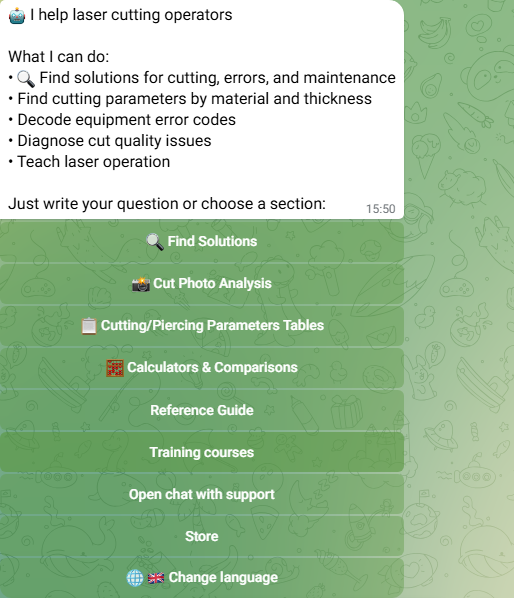
The menu is sticky — at any point, the /menu command brings you back. You can also type /help for a quick description of every command.
Picking your language
On first run you choose from 12 languages: English, Russian, Portuguese (Brazilian), Spanish, German, French, Italian, Turkish, Polish, Uzbek, Hindi, Arabic. You can change it at any time via 🌐 Change language in the main menu. Your choice is remembered per account, not per device — same login on the web client and on your phone uses the same language.
📸 Cut-Photo Diagnostics
Tap Cut Photo Analysis on the main menu. You'll see three start options: Specify parameters, Use defaults, or Just send photo.
If you specify the parameters (material, thickness, gas, laser power), the bot can give a much sharper diagnosis. If not, the bot infers what it can from the image. Either way, send the photo. Within seconds the bot returns a ranked list of likely causes with the parameter change typically associated with each one.
Quotas: Free 5/month · Operator 15/month · Engineer 50/month · Professional 300/month.
📋 Parameter Tables
Three sub-tools: Cutting, Piercing, Welding. Pick a material, thickness, gas, laser power — the bot returns recommended values with a reference range. Cutting and engraving and cleaning tabs are free forever, no quotas. Piercing and welding tables have per-tier monthly quotas (see /pricing/).
🧮 Calculators & Comparisons
Four tools:
- Laser Power Selection — recommended laser power for a target material and thickness
- DXF Sheet-vs-Coil — upload a DXF, get cost-per-part on sheet vs coil-fed
- Plasma vs Laser — side-by-side speed, power, cost
- Gas Flow — nozzle consumption by diameter and pressure
Each calculator has its own monthly quota on the Free and Operator tiers. Engineer and Professional get unlimited use.
⚠ Error Code Lookup
Under Find Solutions → Errors. Type the error code (e.g. E1207) or the partial text on screen. The bot returns the cause, the typical fix, and which part to check. Covers FSCUT 2000/3000, Cypcut, RuiCNC, BCS100 height sensors. Free forever.
📖 Equipment Manuals
Under Reference Guide → Manuals. 40+ full operator manuals across cutting heads (BLT series), software (CypCut, TubePro, HypCut, FACut), chillers, compressors, laser sources (Raycus, IPG), height sensors (BCS100). Searchable text, page-level navigation. View · search · bookmark, all free forever.
💬 Intelligent Assistant
A guided wizard for defect troubleshooting. Describe the symptom in plain language. The bot asks the right follow-up questions (setup, equipment checklist, test cut), then proposes the most-likely root cause with a reference photo.
Use it when Cut-Photo Diagnostics is overkill — when you just want to talk through a problem step by step.
Quotas: Free 5/month · Operator 15/month · Engineer 50/month · Professional 300/month.
📚 Reference Guide
Under Find Solutions → Reference. Six curated categories: Peripherals · Maintenance · Common problems · Software (CAM, nesting, controllers) · Trial-version download links · Equipment datasheets. The cheat-sheet for everything around the cutting machine. Free forever.
🎓 Training Courses
Step-by-step lessons on the major software (CypCut, NCstudio, TubePro, Tubes-T, CypNest, HypCut). Beginner → advanced, each lesson a few minutes. The bot tracks your progress per account. Hand it to a new hire as a self-onboarding kit. Free forever.
💬 Live Support
One tap opens a chat with a real SBM engineer. Free for SBM-warranty machines, paid SLA available for production fleets. Mon–Fri 09:00–18:00 BRT, 12 languages, priority queue for Professional-tier subscribers.
Tiers and quotas
The bot has four tiers:
- Free ($0/mo) — full access to free-forever tools, small monthly quotas on intelligent and DXF tools
- Operator ($3.99/mo) — raised quotas across the board
- Engineer ($7.99/mo) — calculators become unlimited, intelligent quotas at 30/50/mo
- Professional ($14.99/mo) — 150 intelligent searches and 300 assistant + CAD invocations per month, priority support
The bot is free for everyone today; paid tiers are rolling out. When live: Telegram Stars or crypto (30-day periods, manual renewal), with card subscriptions (monthly auto-renewal) coming soon. See /pricing/ for the full comparison matrix and FAQ.
When something doesn't work
- The bot doesn't respond. Make sure you tapped Start or sent
/start. Telegram doesn't forward messages until you do. - «You've reached your monthly limit» means a quota is exhausted for the current month. The bot shows the date your quotas reset, and offers the next tier above.
- Cut-Photo Diagnostics gives a generic answer. Specify your parameters first (material, thickness, gas, power) — the diagnosis sharpens dramatically.
- Can't find an error code. Try the partial text on screen, not just the number. Some controllers print the same code with different messages.
- Need a human. Tap Live Support in the main menu — opens a chat with an SBM engineer.
- Account / subscription issue. Email support@sbmlaserhelp.com. Pro tier gets priority queue.